Starlight provides built-in support for multilingual documentation websites, including translated UI strings for all its components in many languages.
When building custom components, you can extend these UI strings with your own, translate them in each language supported by your website, and use them in your components with the Astro.locals.t() helper.
As your project grows, it becomes easy to forget to translate a new string in every language or to remove a string that is no longer used. x18n can help you spot such issues.
This guide will show you how to use x18n to find translation issues in a multilingual Starlight project.
Prerequisites
You will need to have an existing multilingual Starlight website using custom translation strings.
Example project
To illustrate how x18n works, this guide will use an example Starlight project with a custom changelog page listing changes in each version of a package.
Languages
The example project is available in three languages: English as the root locale, French, German, and uses the following configuration:
import starlight from '@astrojs/starlight'import { defineConfig } from 'astro/config'
export default defineConfig({  integrations: [    starlight({      title: 'My Docs',      locales: {        root: { label: 'English', lang: 'en' },        fr: { label: 'Français', lang: 'fr' },        de: { label: 'Deutsch', lang: 'de' },      },    }),  ],})
Custom UI strings
The changelog page uses custom UI strings prefixed with changelog. to display the release date of a version and links to navigate between versions.
The following i18n data collection configuration extends Starlight translation schema with these new keys:
import { defineCollection } from 'astro:content'import { z } from 'astro/zod'import { docsLoader, i18nLoader } from '@astrojs/starlight/loaders'import { docsSchema, i18nSchema } from '@astrojs/starlight/schema'
export const collections = {  docs: defineCollection({ loader: docsLoader(), schema: docsSchema() }),  i18n: defineCollection({    loader: i18nLoader(),    schema: i18nSchema({      extend: z.object({        'changelog.all': z.string().optional(),        'changelog.previous': z.string().optional(),        'changelog.next': z.string().optional(),        'changelog.date': z.string().optional(),      }),    }),  }),}
The translations for each language are stored in a JSON file in the src/content/i18n/ directory.
The English translation file includes all the custom UI strings:
{ "changelog.all": "All versions", "changelog.previous": "Previous version", "changelog.next": "Next version", "changelog.date": "Released on {{date}}"}The French translation file is missing the release date string:
{ "changelog.all": "Toutes les versions", "changelog.previous": "Version précédente", "changelog.next": "Version suivante"}The German translation file only includes a single string:
{ "changelog.all": "Alle Versionen"}Changelog component
The custom UI strings are used in an Astro component rendered at the bottom of each changelog entry.
The Astro.locals.t() helper is used to display the release date of a version and links to the previous and next versions:
---interface Props {  date: string  previous: string  next: string}
const { date, previous, next } = Astro.props---
<p>{Astro.locals.t('changelog.date', { date })}</p><nav>  <a href={previous}>{Astro.locals.t('changelog.previous')}</a>  <a href={next}>{Astro.locals.t('changelog.next')}</a></nav>
A previous version of this component included a link to the page listing all versions, leaving the changelog.all key unused.
Configure x18n
x18n can be configured using many different formats, but this guide uses a YAML configuration file located at the root of the project.
The following configuration sets up x18n for the project by specifying the source locale, the location of the translation files, the i18next preset for the library used by Starlight to handle UI string translations, and the helper used to render UI strings.
# yaml-language-server: $schema=https://x18n.dev/schema/config.json
# The default language of the project.sourceLocale: enresources:  # The location of the translation files for each language.  - pattern: src/content/i18n/{locale}.jsonpresets:  # Starlight uses i18next for UI strings.  - i18nextusage:  calls:    # The helper used to render UI strings in Starlight.    - callee: Astro.locals.t
Check translations
With x18n configured, you can run the check command at the root of your project to find translation issues:
npx @x18n/cli checkpnpx @x18n/cli checkyarn dlx @x18n/cli checkbunx @x18n/cli checknlx @x18n/cli checkThe command reports each issue found in the translation files:
src/content/i18n/en.json:2:4 WARNING  "changelog.all" is not used.  unused-key1 │ {2 │   "changelog.all": "All versions",  │    ~~~~~~~~~~~~~3 │   "changelog.previous": "Previous version",
src/content/i18n/en.json:3:4 WARNING  "changelog.previous" is missing in de.  missing-translation2 │   "changelog.all": "All versions",3 │   "changelog.previous": "Previous version",  │    ~~~~~~~~~~~~~~~~~~4 │   "changelog.next": "Next version",
src/content/i18n/en.json:4:4 WARNING  "changelog.next" is missing in de.  missing-translation3 │   "changelog.previous": "Previous version",4 │   "changelog.next": "Next version",  │    ~~~~~~~~~~~~~~5 │   "changelog.date": "Released on {{date}}"
src/content/i18n/en.json:5:4 WARNING  "changelog.date" is missing in de, fr.  missing-translation4 │   "changelog.next": "Next version",5 │   "changelog.date": "Released on {{date}}"  │    ~~~~~~~~~~~~~~6 │ }
⚠ 4 warnings  1 file
The reported issues match the ones introduced in the example project:
- The
changelog.allkey is reported by theunused-keycheck as it is defined in the English translation file but no longer used by any component. - The
changelog.previousandchangelog.nextkeys are reported by themissing-translationcheck as they are missing from the German translation file. - The
changelog.datekey is reported by themissing-translationcheck as it is missing from the French and German translation files.
Use the x18n UI
x18n also comes with a UI where you can get an overview of all translation issues, browse and edit translation keys across languages, and see where each key is used.
To start the UI, run the following command at the root of your project:
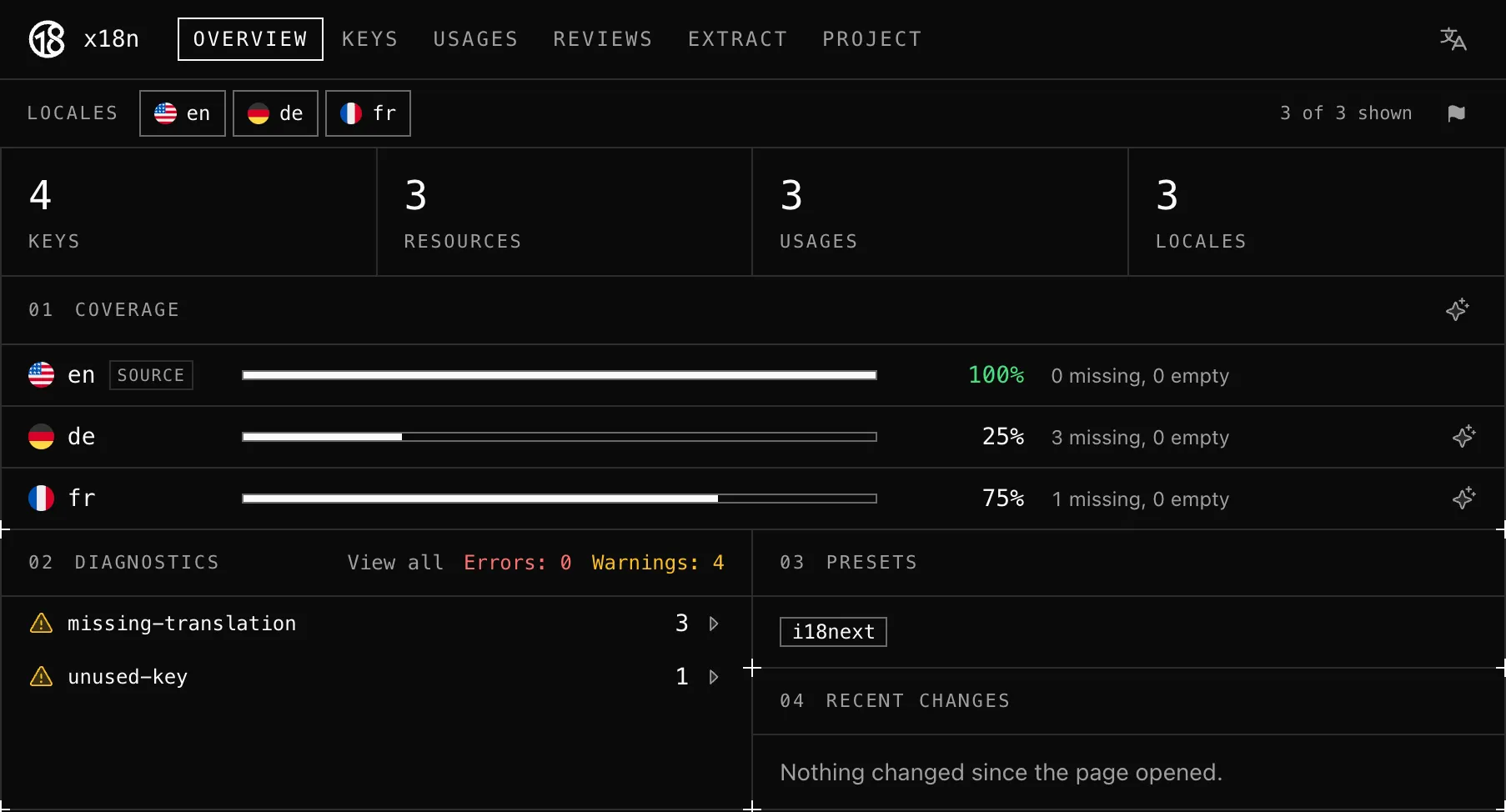
npx @x18n/cli uipnpx @x18n/cli uiyarn dlx @x18n/cli uibunx @x18n/cli uinlx @x18n/cli uiThe UI opens in your browser with an overview of the project including the translation coverage of each language and the issues found:
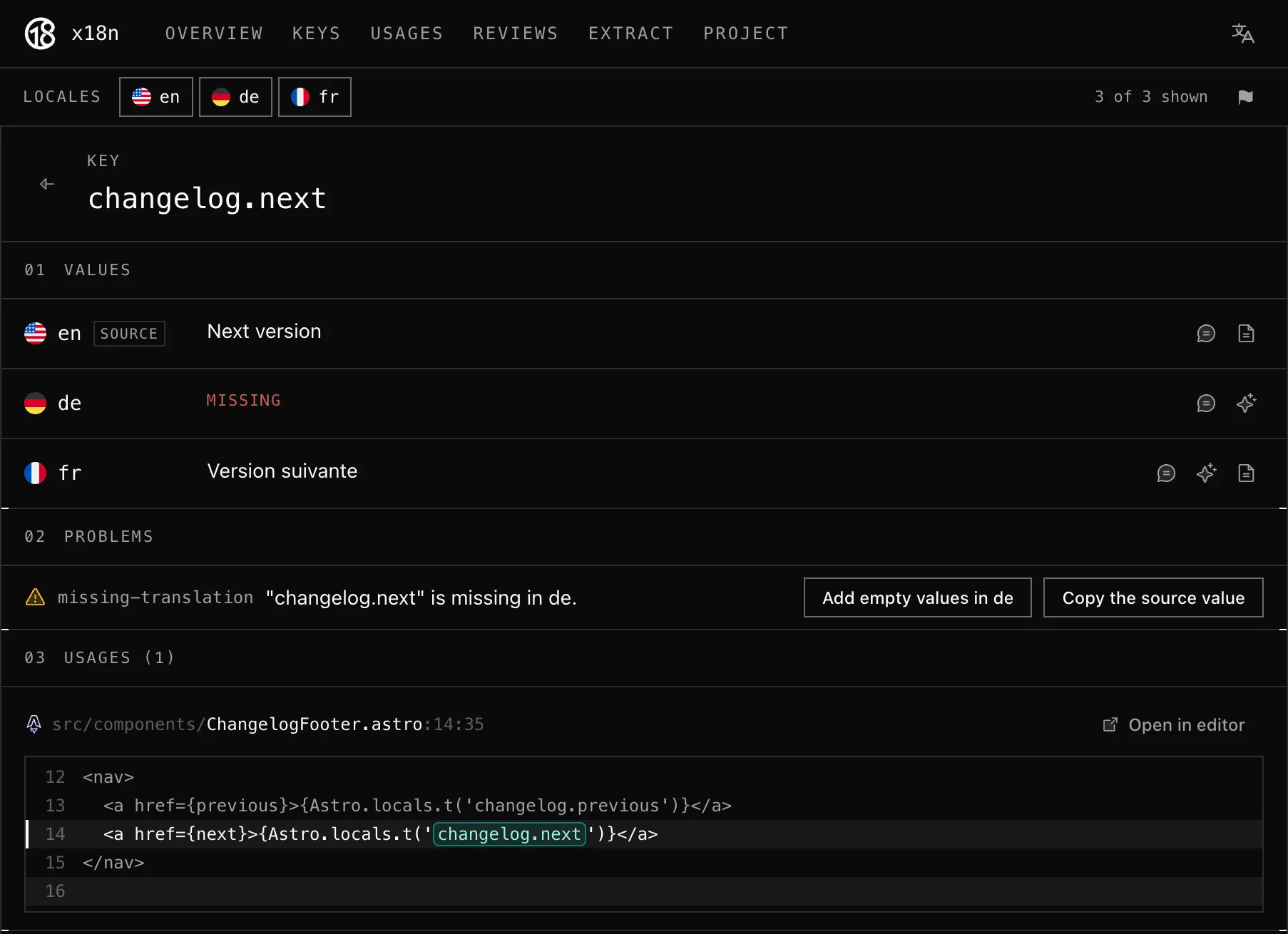
The “Keys” page lists all translation keys, and selecting one of them opens a page with its translation in each language, its issues, and where it is used in the project:
Up to you to explore the other features provided by x18n, e.g. a Visual Studio Code extension showing translations in your editor.